Welcome to the contributing guide
Thank you for your interest in contributing to kew!
kew is developed on: https://codeberg.org/ravachol/kew - Issues, PR:s go here.
Mirror: https://github.com/ravachol/kew - Still used for some workflows that haven’t been migrated yet.
Goal of the project
The goal of kew is to provide a quick and easy way for people to listen to music with the absolute minimum of inconvenience. It’s a small app, limited in scope and it shouldn’t be everything to all people. It should continue to be a very light weight app.
For instance, it’s not imagined as a software for dj’ing or as a busy music file manager with all the features.
We want to keep the codebase easy to manage and free of bloat, so might reject a feature out of that reason only.
Reporting Bugs and Suggesting Enhancements
Please report any bugs on Codeberg, with as much relevant detail as possible.
Security
Reporting a Bug
If you find a security related issue, please contact us at kew-player AT proton DOT me.
When a fix is published, you will receive credit under your real name or bug tracker handle in Codeberg. If you prefer to remain anonymous or pseudonymous, you should mention this in your e-mail.
Disclosure Policy
The maintainer will coordinate the fix and release process, involving the following steps:
- Confirm the problem and determine the affected versions.
- Audit code to find any potential similar problems.
- Prepare fix for the latest release. This fix will be released as fast as possible.
You may be asked to provide further information in pursuit of a fix.
For Developers
This text will help you setup your development environment. It is intended to be beginner friendly as we welcome and encourage people who are just starting to learn about programming in C to contribute to this project. We also welcome senior developers of course, but much of this document will be redundant if you are experienced.
Before doing a lot of work
Please contact us first and discuss your plans if you are trying to do something big, so your PR doesn’t get rejected after having spent a lot of time on it. You can for instance open a PR that contains your intent, and continue working on it if the response is positive.
Just ask
If you run into any problems just ask for help in an email to kew-player AT proton DOT me or in the PR itself.
Prerequisites
Before contributing, ensure you have the following tools installed on your development machine:
- GCC (or another compatible C/C++ compiler)
- Make
- Git
- Valgrind
- An editor: VSCodium, VSCode, Vim, Emacs or some other editor.
Building the Project
Run the following commands:
   git clone https://codeberg.org/ravachol/kew.git --single-branch --branch develop
   cd kew
   make DEBUG=1 -j
   sudo make install
You can use either DEBUG=1 or DEBUG=2. DEBUG=2 is helpful because it crashes on any errors and logs why. Both log to error.log.
Coding style
We have adopted the same coding style for the most part as the Linux kernel developers: https://www.kernel.org/doc/html/v4.10/process/coding-style.html
If you can, use EditorConfig for VS Code Extension that is prepared for this style. There is a file with settings for it: .editorconfig.
Commenting
Please refrain from using a lot of comments, and make sure that they are in English. I am not a big believer in comments and avoid commenting as much as possible. If you feel you need to add a comment, please first consider if you can make the function or variable names clearer, or if you can structure the code differently so that it is simpler and the intent is clear, or if you can make the code block into a function with a name that explains crystally clear what is going on. Remove comments that aren’t strictly needed.
Architecture
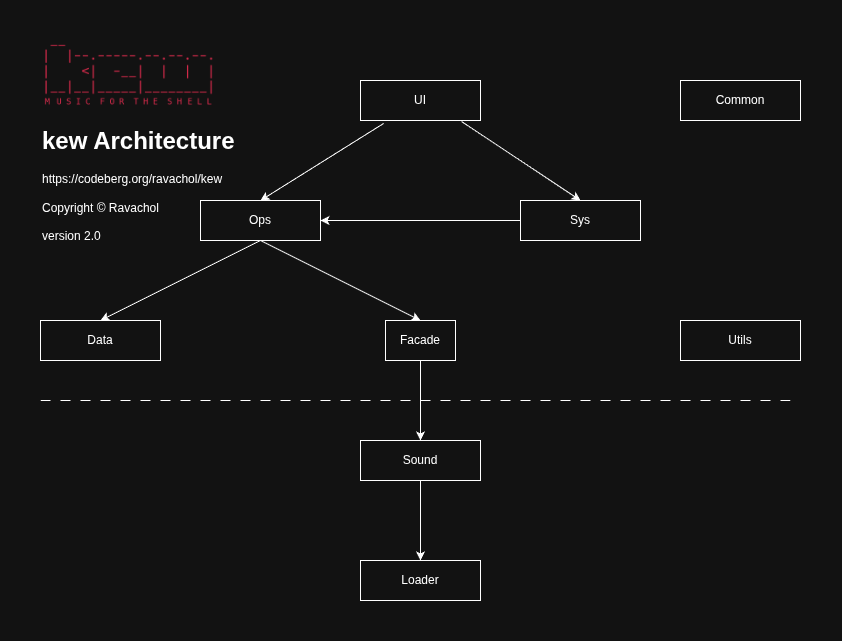
kew developers should strive to follow the above architecture, so that function calls only go in the direction of the arrows. For instance, functions in ops module never call functions in ui module as there is no arrow pointing from ops to ui. Please make sure your PR follows this architecture, and place your code in the correct module (directory). If you have doubts in where to place it, just ask.
Dev Docs
There is a work in progress dev docs.
Debugging with VSCodium
Install extension clangd, C/C++ Debug (gdb) and EditorConfig.
Install the program bear that can generate a compile_commands.json. This helps clangd find libs.
Run bear -- make.
Search settings for ‘external. Change “Terminal External Linux Exec” to konsole or kitty, or your favorite terminal emulator. This should make kew open in its own window, when debugging.
This should enable you to develop kew on VSCodium.
Memory debugging with Valgrind
To use Valgrind for memory debugging:
Run make.
Run Valgrind on your binary:
valgrind --leak-check=full --track-origins=yes --show-leak-kinds=all \
        --log-file=valgrind-out.txt --show-reachable=no -s ./kew
Create a pull request
After making any changes, open a pull request on Codeberg, develop branch.
Issue assignment
We don’t have a process for assigning issues to contributors. Please feel free to jump into any issues in this repo that you are able to help with. Duplicate work might be avoided if everybody keeps an eye on what’s going on on in the repo.